Odoo 17 · 18 · 19 — Inventory
Your Zebra labels shouldn’t need a developer.
ZPL Label Designer Pro puts a drag-and-drop canvas inside Odoo. Drop in fields from any model, drag a barcode where you want it, preview it against a real record, and print. No ZPL syntax, no guesswork, no stack of wasted test labels.
€80 one-time · lifetime license · no subscription
If you’ve said any of these out loud this month, this module is for you.
Changing one line on our shipping label is a developer ticket and a two-week wait.
→ Warehouse leads edit it themselves
We burn through half a roll of stock every time we tweak a template.
→ Preview on screen, print once
Product labels, lot labels, pallet labels — each one is its own custom module.
→ One designer, any Odoo model
Our label software is outside Odoo, so it never has current data.
→ Renders against live records
None of this is a Zebra problem. ZPL is a printer control language written for machines,
and every hour your team spends hand-editing ^FO50,50^A0N
is an hour not spent shipping. The fix isn’t better ZPL documentation — it’s not writing ZPL at all.
A .zpl file someone wrote in 2019
Nobody remembers the coordinate system. The one person who understood it left. Every new label starts by copying the old one and hoping. Testing means printing.
A canvas anyone on your team can open
Drag an element, bind it to a field, see it rendered against a real record. Export the design as JSON, import it on the next database. Nothing is locked in one head.
Three steps from install to a printed label.
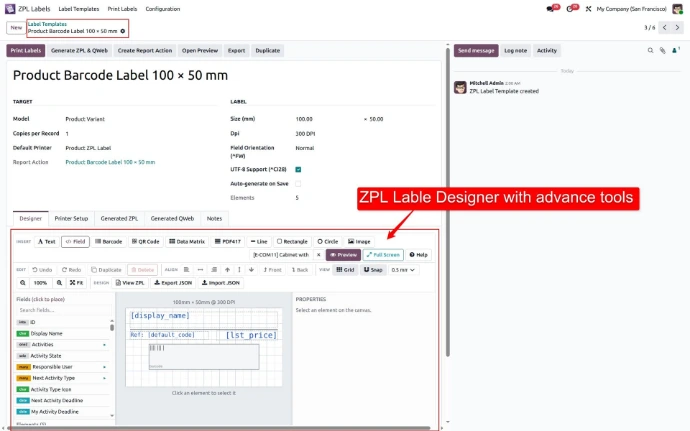
Point it at any model
Pick product.product,
stock.lot,
res.partner — or your own
custom model. The field browser reads your schema live, including related fields,
so anything Odoo knows can go on a label.
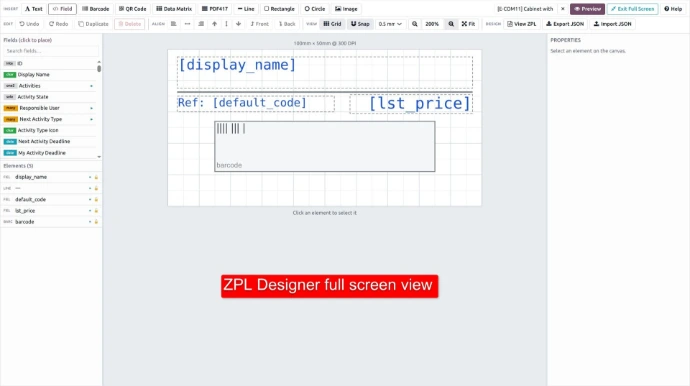
Design on the canvas
Drag text, dynamic fields, barcodes, shapes and images into place on a real-scale canvas. Snap, align, resize, set fonts and rotation. The preview panel renders the actual label against a real record from your database while you work — so what you see is what the printer will burn.
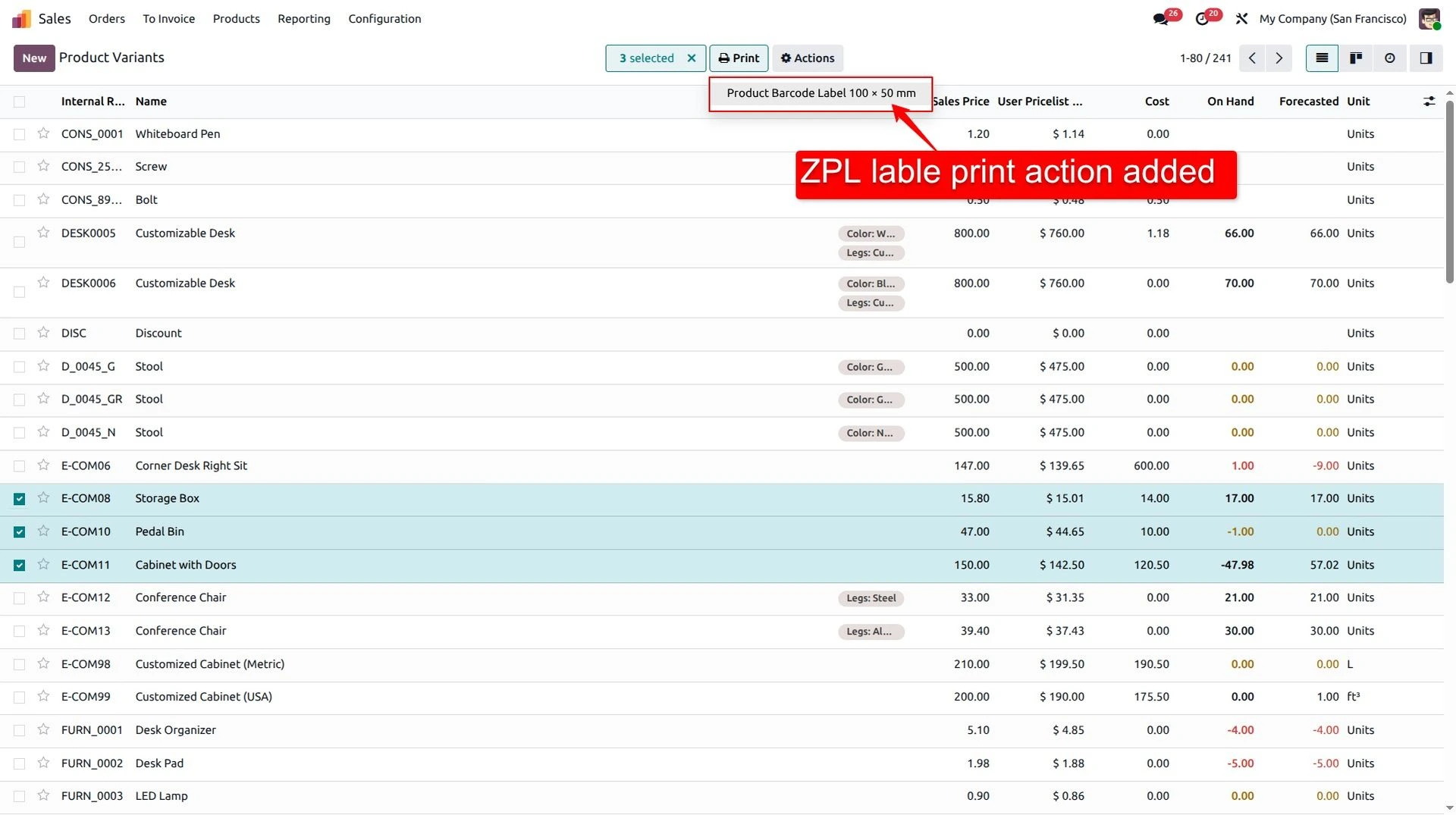
Print from where you already work
Send straight to a network Zebra over TCP/IP, or download the raw ZPL. Better: generate an Odoo Report Action in one click, and the label appears in the Print menu of any list or form view — select 40 products, print 40 labels.
Everything the label actually needs.
Visual canvas editor. Konva-powered drag, drop, snap and resize at true label scale.
Any installed model. Products, lots, pickings, partners, sale orders, your custom models.
Live preview on real records. Rendered through the Labelary engine before a single label is wasted.
Every barcode you'll be asked for. Code 128, EAN-13, UPC, QR, Data Matrix, PDF417.
9 ready-made presets. Shipping, product, lot, address, price tag and more — from ZPL Labels › New from Library.
Direct network printing. TCP/IP to any Zebra, or download the raw .zpl.
Print-menu integration. Generate a Report Action and batch-print from any list view.
Images with real dithering. Logos and product photos converted for sharp 1-bit thermal output.
UTF-8 out of the box. ^CI28 set for you — accented and non-Latin text prints correctly.
203 / 300 / 600 dpi. Plus media type, print speed and darkness per printer.
Role-based security. Separate Designer User and Designer Manager groups.
JSON export / import. Move designs between staging and production without redoing the work.
Built for the people printing hundreds of labels a day.
Shipping and pallet labels
Carrier layouts change; your labels shouldn’t need a release. Batch-print from the picking list view.
Shelf edge and price tags
Price tags that pull live pricelist data, reprinted the moment a price changes.
Lot, batch and traceability
Lot numbers, expiry dates and Data Matrix codes straight off stock.lot.
Stop quoting label work
Deliver client label requirements in an afternoon instead of scoping a custom module.
Compliance labels
Ingredients, allergens and expiry with UTF-8 text and GS1-ready barcodes.
You don’t own a Zebra
This outputs ZPL II. For plain PDF labels on an office printer, standard Odoo reports already work.
The details your IT team will ask for.
| Odoo versions | 17.0 · 18.0 · 19.0 — Community and Enterprise |
|---|---|
| Price | €80 one-time, per database. No recurring fee. |
| License | LGPL-3 |
| Odoo dependencies | base · web · mail |
| Python dependencies | requests · Pillow (PIL) |
| Printer language | ZPL II |
| Resolution | 203 / 300 / 600 dpi |
| Barcode symbologies | Code 128 · EAN-13 · UPC · QR · Data Matrix · PDF417 |
| Printer connection | TCP/IP to any network Zebra, or raw .zpl download |
| Character encoding | UTF-8 (^CI28) |
| Security groups | ZPL Designer / User · ZPL Designer / Manager |
| Support | devpybeans@gmail.com — included, plus version-upgrade support |
Hosting note: this is an installable Odoo module, so it runs on Odoo.sh, on-premise or any self-managed deployment. Odoo Online (SaaS) does not permit third-party modules.
The questions everyone asks first.
Do I need Odoo Enterprise?
No. It runs on Community and Enterprise, 17 through 19. It depends only on base, web and mail — no Inventory or Manufacturing licence required, though it works happily alongside them.
Is this a subscription?
No. €80 once, per database, and it stays yours. Support and help moving to a newer Odoo version are included — not billed as an upgrade.
Which printers does it work with?
Any printer that speaks ZPL II — the Zebra ZD, ZT and ZQ families and the many ZPL-compatible printers from other manufacturers. Connect over TCP/IP and print directly, or download the raw ZPL and pipe it wherever you like.
Does the live preview send my data outside Odoo?
The on-screen preview is rendered through the public Labelary service, so the ZPL for the label being previewed leaves your server while you are designing. Printing does not — that goes straight from Odoo to your printer. If preview traffic is a compliance concern, design against a sample record and tell us; we can point the renderer at a self-hosted Labelary instance.
Can I use it with my own custom model?
Yes — that’s the point. The field browser reads whatever is installed in your database, including your own models and related fields. No code changes needed to support a new model.
What if I need a layout it can’t do?
Tell us. Custom development and version support are part of what we do — write to devpybeans@gmail.com with the label spec and we’ll tell you honestly whether it’s a setting, a small change, or genuinely out of scope.
Can I see it running before I pay?
Yes. Book a live session and we’ll design one of your real labels on screen, against your own field structure, in about twenty minutes.
ZPL Label Designer Pro
Bring us your worst label. We’ll build it live.
Twenty minutes, your fields, your printer spec. If it can’t do what you need, we’ll say so on the call rather than sell you the module.
Or use the form below — we answer within one business day.
Odoo 17 · 18 · 19 — Inventory
Your Zebra labels shouldn’t need a developer.
ZPL Label Designer Pro puts a drag-and-drop canvas inside Odoo. Drop in fields from any model, drag a barcode where you want it, preview it against a real record, and print. No ZPL syntax, no guesswork, no stack of wasted test labels.
€80 one-time · lifetime license · no subscription
If you’ve said any of these out loud this month, this module is for you.
Changing one line on our shipping label is a developer ticket and a two-week wait.
→ Warehouse leads edit it themselves
We burn through half a roll of stock every time we tweak a template.
→ Preview on screen, print once
Product labels, lot labels, pallet labels — each one is its own custom module.
→ One designer, any Odoo model
Our label software is outside Odoo, so it never has current data.
→ Renders against live records
None of this is a Zebra problem. ZPL is a printer control language written for machines,
and every hour your team spends hand-editing ^FO50,50^A0N
is an hour not spent shipping. The fix isn’t better ZPL documentation — it’s not writing ZPL at all.
A .zpl file someone wrote in 2019
Nobody remembers the coordinate system. The one person who understood it left. Every new label starts by copying the old one and hoping. Testing means printing.
A canvas anyone on your team can open
Drag an element, bind it to a field, see it rendered against a real record. Export the design as JSON, import it on the next database. Nothing is locked in one head.
Three steps from install to a printed label.
Point it at any model
Pick product.product,
stock.lot,
res.partner — or your own
custom model. The field browser reads your schema live, including related fields,
so anything Odoo knows can go on a label.
Design on the canvas
Drag text, dynamic fields, barcodes, shapes and images into place on a real-scale canvas. Snap, align, resize, set fonts and rotation. The preview panel renders the actual label against a real record from your database while you work — so what you see is what the printer will burn.
Print from where you already work
Send straight to a network Zebra over TCP/IP, or download the raw ZPL. Better: generate an Odoo Report Action in one click, and the label appears in the Print menu of any list or form view — select 40 products, print 40 labels.
Everything the label actually needs.
Visual canvas editor. Konva-powered drag, drop, snap and resize at true label scale.
Any installed model. Products, lots, pickings, partners, sale orders, your custom models.
Live preview on real records. Rendered through the Labelary engine before a single label is wasted.
Every barcode you'll be asked for. Code 128, EAN-13, UPC, QR, Data Matrix, PDF417.
9 ready-made presets. Shipping, product, lot, address, price tag and more — from ZPL Labels › New from Library.
Direct network printing. TCP/IP to any Zebra, or download the raw .zpl.
Print-menu integration. Generate a Report Action and batch-print from any list view.
Images with real dithering. Logos and product photos converted for sharp 1-bit thermal output.
UTF-8 out of the box. ^CI28 set for you — accented and non-Latin text prints correctly.
203 / 300 / 600 dpi. Plus media type, print speed and darkness per printer.
Role-based security. Separate Designer User and Designer Manager groups.
JSON export / import. Move designs between staging and production without redoing the work.
Built for the people printing hundreds of labels a day.
Shipping and pallet labels
Carrier layouts change; your labels shouldn’t need a release. Batch-print from the picking list view.
Shelf edge and price tags
Price tags that pull live pricelist data, reprinted the moment a price changes.
Lot, batch and traceability
Lot numbers, expiry dates and Data Matrix codes straight off stock.lot.
Stop quoting label work
Deliver client label requirements in an afternoon instead of scoping a custom module.
Compliance labels
Ingredients, allergens and expiry with UTF-8 text and GS1-ready barcodes.
You don’t own a Zebra
This outputs ZPL II. For plain PDF labels on an office printer, standard Odoo reports already work.
The details your IT team will ask for.
| Odoo versions | 17.0 · 18.0 · 19.0 — Community and Enterprise |
|---|---|
| Price | €80 one-time, per database. No recurring fee. |
| License | LGPL-3 |
| Odoo dependencies | base · web · mail |
| Python dependencies | requests · Pillow (PIL) |
| Printer language | ZPL II |
| Resolution | 203 / 300 / 600 dpi |
| Barcode symbologies | Code 128 · EAN-13 · UPC · QR · Data Matrix · PDF417 |
| Printer connection | TCP/IP to any network Zebra, or raw .zpl download |
| Character encoding | UTF-8 (^CI28) |
| Security groups | ZPL Designer / User · ZPL Designer / Manager |
| Support | devpybeans@gmail.com — included, plus version-upgrade support |
Hosting note: this is an installable Odoo module, so it runs on Odoo.sh, on-premise or any self-managed deployment. Odoo Online (SaaS) does not permit third-party modules.
The questions everyone asks first.
Do I need Odoo Enterprise?
No. It runs on Community and Enterprise, 17 through 19. It depends only on base, web and mail — no Inventory or Manufacturing licence required, though it works happily alongside them.
Is this a subscription?
No. €80 once, per database, and it stays yours. Support and help moving to a newer Odoo version are included — not billed as an upgrade.
Which printers does it work with?
Any printer that speaks ZPL II — the Zebra ZD, ZT and ZQ families and the many ZPL-compatible printers from other manufacturers. Connect over TCP/IP and print directly, or download the raw ZPL and pipe it wherever you like.
Does the live preview send my data outside Odoo?
The on-screen preview is rendered through the public Labelary service, so the ZPL for the label being previewed leaves your server while you are designing. Printing does not — that goes straight from Odoo to your printer. If preview traffic is a compliance concern, design against a sample record and tell us; we can point the renderer at a self-hosted Labelary instance.
Can I use it with my own custom model?
Yes — that’s the point. The field browser reads whatever is installed in your database, including your own models and related fields. No code changes needed to support a new model.
What if I need a layout it can’t do?
Tell us. Custom development and version support are part of what we do — write to devpybeans@gmail.com with the label spec and we’ll tell you honestly whether it’s a setting, a small change, or genuinely out of scope.
Can I see it running before I pay?
Yes. Book a live session and we’ll design one of your real labels on screen, against your own field structure, in about twenty minutes.
ZPL Label Designer Pro
Bring us your worst label. We’ll build it live.
Twenty minutes, your fields, your printer spec. If it can’t do what you need, we’ll say so on the call rather than sell you the module.
Or use the form below — we answer within one business day.